Improved caching of nested images and PDF page images. This should result in large canvases loading much faster (the second time). The first time you open a scene, the images need to be generated and cached. But the next time you open the scene on the same device, the scene will load much faster.
Excalidraw is finally supporting different AI subscriptions, not only OpenAI. Mermaid text to diagram, diagram to code, and ExcliAI script all honor the AI settings and are all working again.
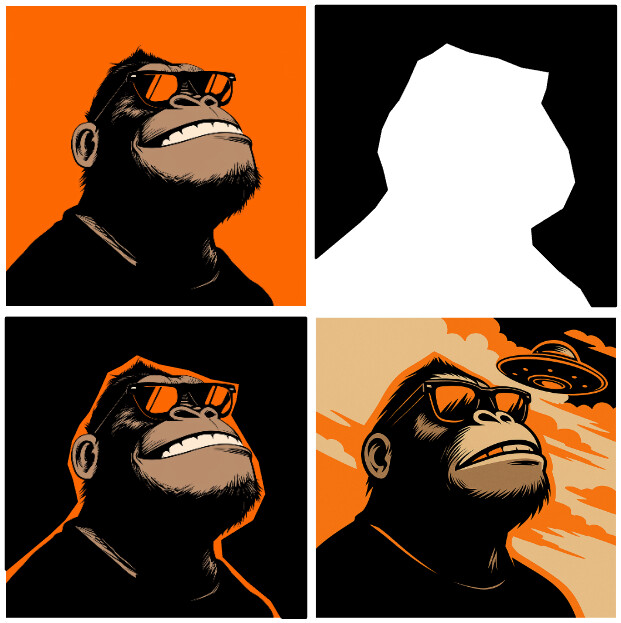
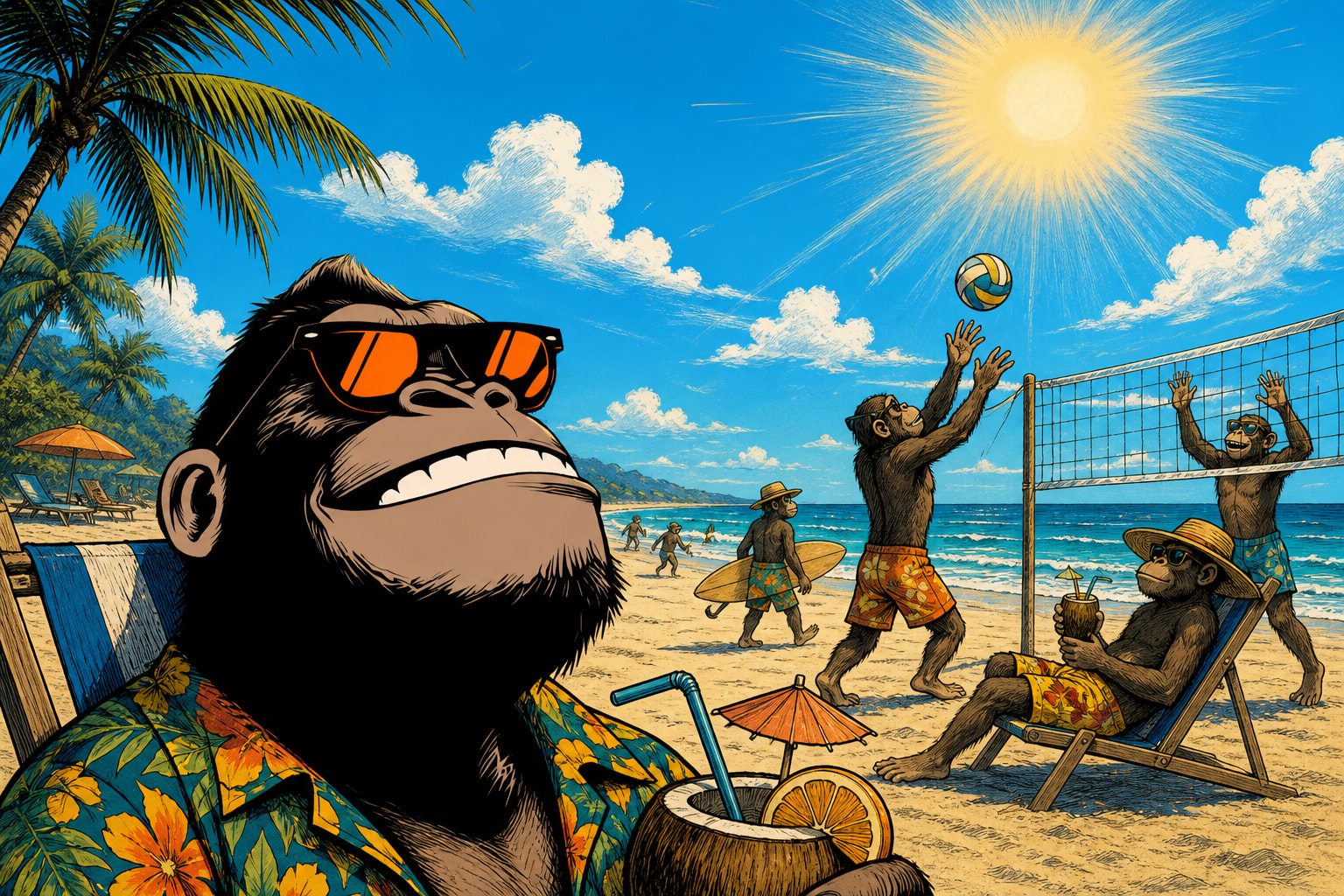
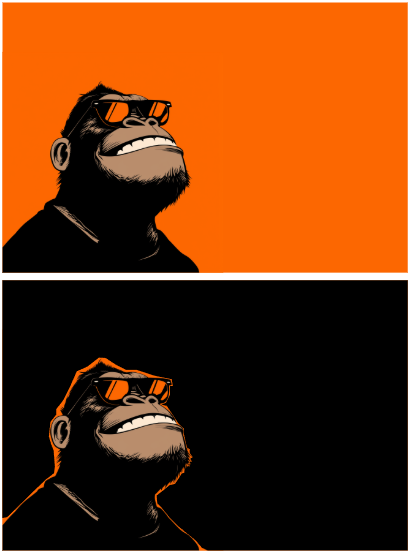
Here’s an image I created using ExcaliAI image editing with a mask and a prompt via the OpenAI gpt-image-1-mini model.
Added image cache for nested images, including nested Excalidraw drawings and PDF page renders.
When a scene is opened again on the same device, cached images are shown immediately while validation of nested changes continues in the background. This should noticeably improve loading times for scenes you access regularly.
A new setting under plugin settings in Image caching and rendering optimization lets you control cache retention in days, so you can balance disk usage against how long these cached images are kept available.
The cache is local to each device. It is not synced through Obsidian Sync or your vault, so each device builds and maintains its own cache independently.
Placeholder image for empty drawings.
AI support is now provider-aware across the plugin. You can choose between OpenAI, Anthropic/Claude, Google/Gemini, xAI/Grok, or an OpenAI-compatible/local endpoint.
The shared AI configuration is now used by ExcalidrawAutomate, Mermaid chat, diagram-to-code, and related AI features.
Older OpenAI-specific AI settings are migrated automatically into the new shared AI settings on first run.
Fixed Mermaid chat / text-to-diagram and diagram-to-code to use the shared AI layer and honor the configured provider, model, API key, and endpoint settings.
Fixed the ExcaliAI script to work with the new shared AI settings, including OpenAI image responses that return `b64_json` instead of a hosted URL.
New in ExcalidrawAutomate
Added new AI helper functions for scripts while retaining backward compatibility for existing postOpenAI() integrations.
Added extractCodeBlocks() to simplify parsing model responses that return fenced code blocks.
Updated addImage() to accept data:image/... data URLs directly, in addition to files, hyperlinks, vault paths, and PDF++ references.
/**
 * Posts an AI request to the currently configured provider and returns the response.
 * @param {AIRequest} request - The AI request configuration.
 * @returns {Promise<RequestUrlResponse>} Promise resolving to the provider-normalized API response.
 */
public async postAI(request: AIRequest): Promise<RequestUrlResponse>;

/**
 * Posts an AI request to the OpenAI API and returns the response.
 * @param {AIRequest} request - The AI request configuration.
 * @returns {Promise<RequestUrlResponse>} Promise resolving to the API response.
 */
public async postOpenAI(request: AIRequest): Promise<RequestUrlResponse>;

/**
 * Extracts code blocks from markdown text.
 * @param {string} markdown - The markdown string to parse.
 * @returns {Array<{ data: string, type: string }>} Array of objects containing code block contents and types.
 */
public extractCodeBlocks(markdown: string): { data: string, type: string }[];

/**
 * Adds an image element to the ExcalidrawAutomate instance.
 * @param {number | AddImageOptions} topXOrOpts - The x-coordinate of the top-left corner or an options object.
 * @param {number} topY - The y-coordinate of the top-left corner.
 * @param {TFile | string} imageFile - The image file, hyperlink, vault path, PDF++ reference, or data URL.
 * @param {boolean} [scale=true] - Whether to scale the image to MAX_IMAGE_SIZE.
 * @param {boolean} [anchor=true] - Whether to anchor the image at 100% size.
 * @returns {Promise<string>} Promise resolving to the ID of the added image element.
 */
async addImage(
  topXOrOpts: number | AddImageOptions,
  topY: number,
  imageFile: TFile | string,
  scale: boolean = true,
  anchor: boolean = true,
): Promise<string>;
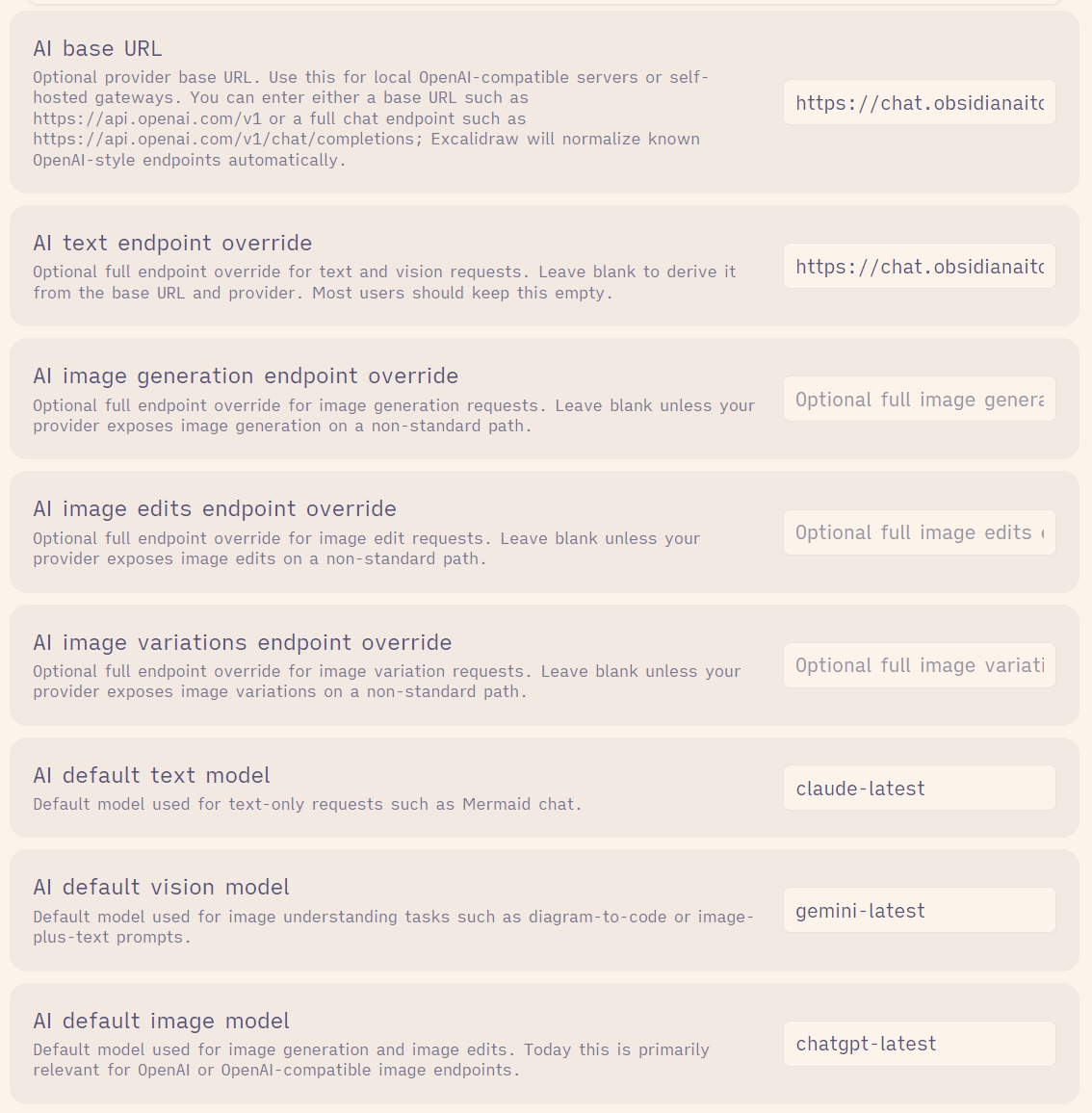
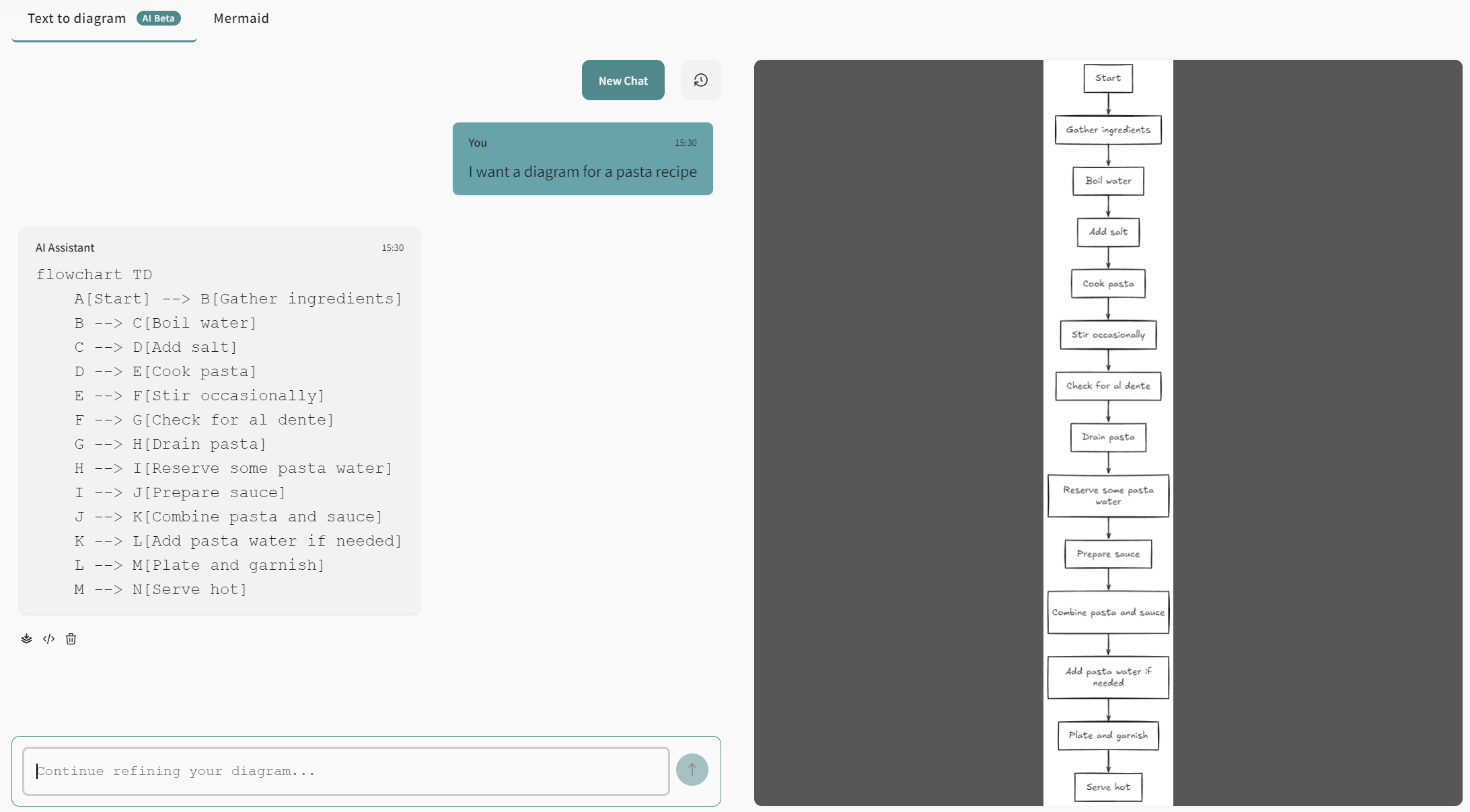
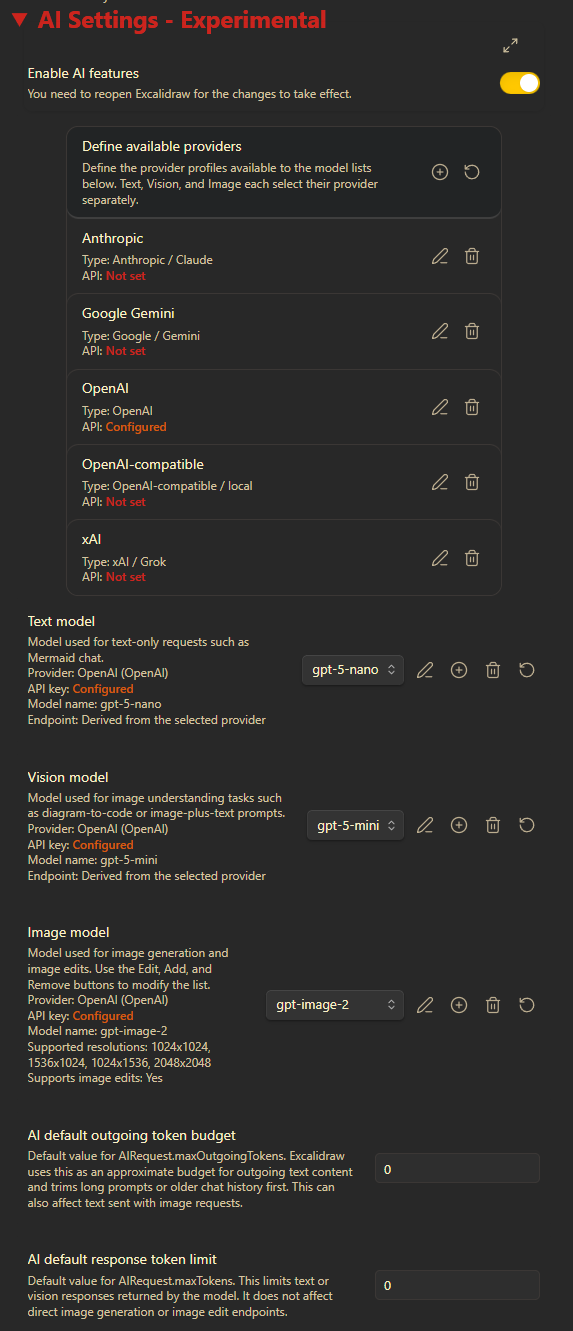
just performed a quick little test. I have an Obsidian AI Tools subscription which is OpenAI-compatible and provides access to a multitude of models. You can see my plugin configuration below. When I use this configuration to generate a diagram from a prompt, it works like a charm – see below a workflow for preparing pasta
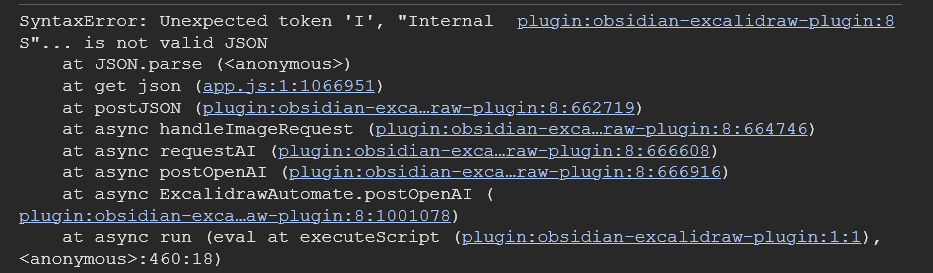
However, I have also tried several ExcaliAI things with different prompts, with and without images as starting point and also switched around the models for the different actions. However, I am always running into errors of the type “Invalid API key provided”. Considering that the diagram generation works I would assume that my credentials are okay – do you have an idea what might be the issue?
There are many issues. I’ve ended up working on this all day today as well.
Did you update ExcaliAI from the script store? I’ve made changes. Given where I am with changes, you are probably best off waiting a little, I will publish -beta-2 soon, that will come with a new ExcaliAI version.
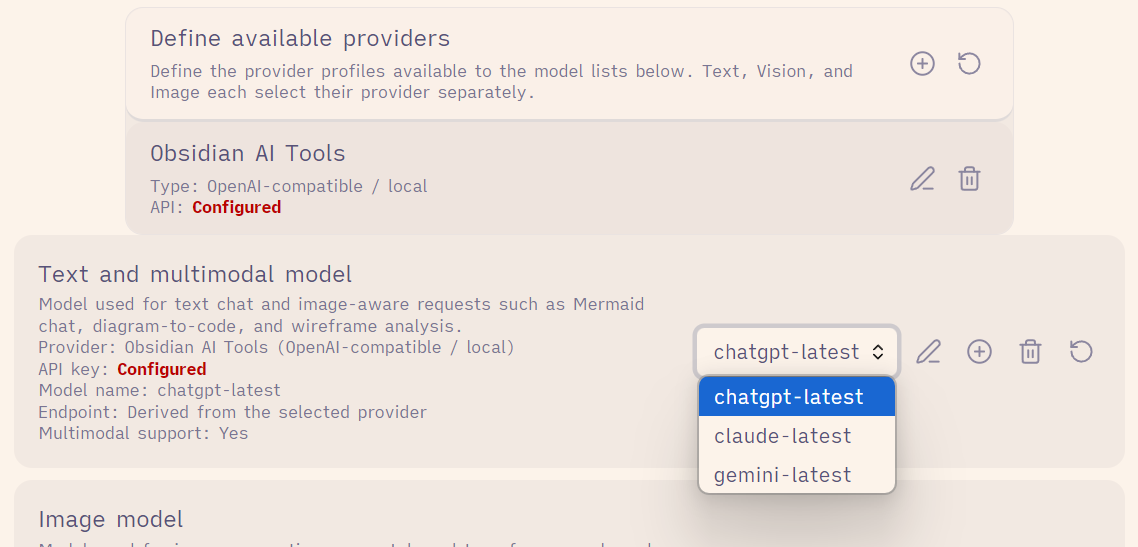
Settings now support defining multiple providers and models
ExcaliAI will follow the model you set (dall-e-2 is no longer hard coded)
Excalidraw with gpt-image-2 becomes a relatively cost effective and very powerful AI image editing tool. Based on my understanding (and supported by some AI based search) this type of image editing is only possible with OpenAI’s gpt-image and dall-e (depricated) models.
The original image was square shaped (see above in first post), so I placed the monkey in a nested Excalidraw drawing to add orange background to make it rectangular, then used this nested, extended drawing when masking and generating the image edit.
ExcaliAI > Challenge my thinking now works most of the time, especially when not supplying a user prompt. Seems like some user prompts trigger an error (will check that in more depth later).
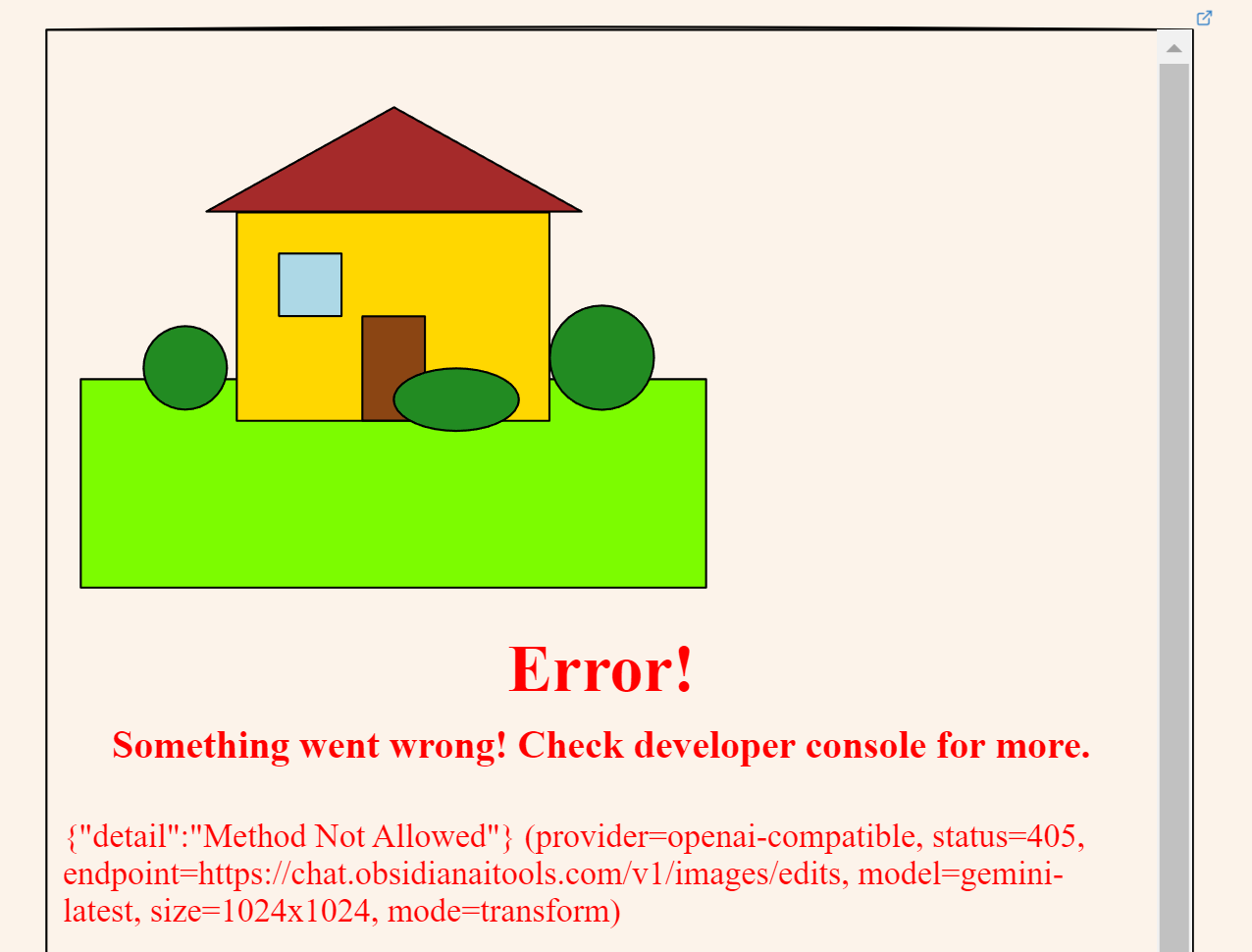
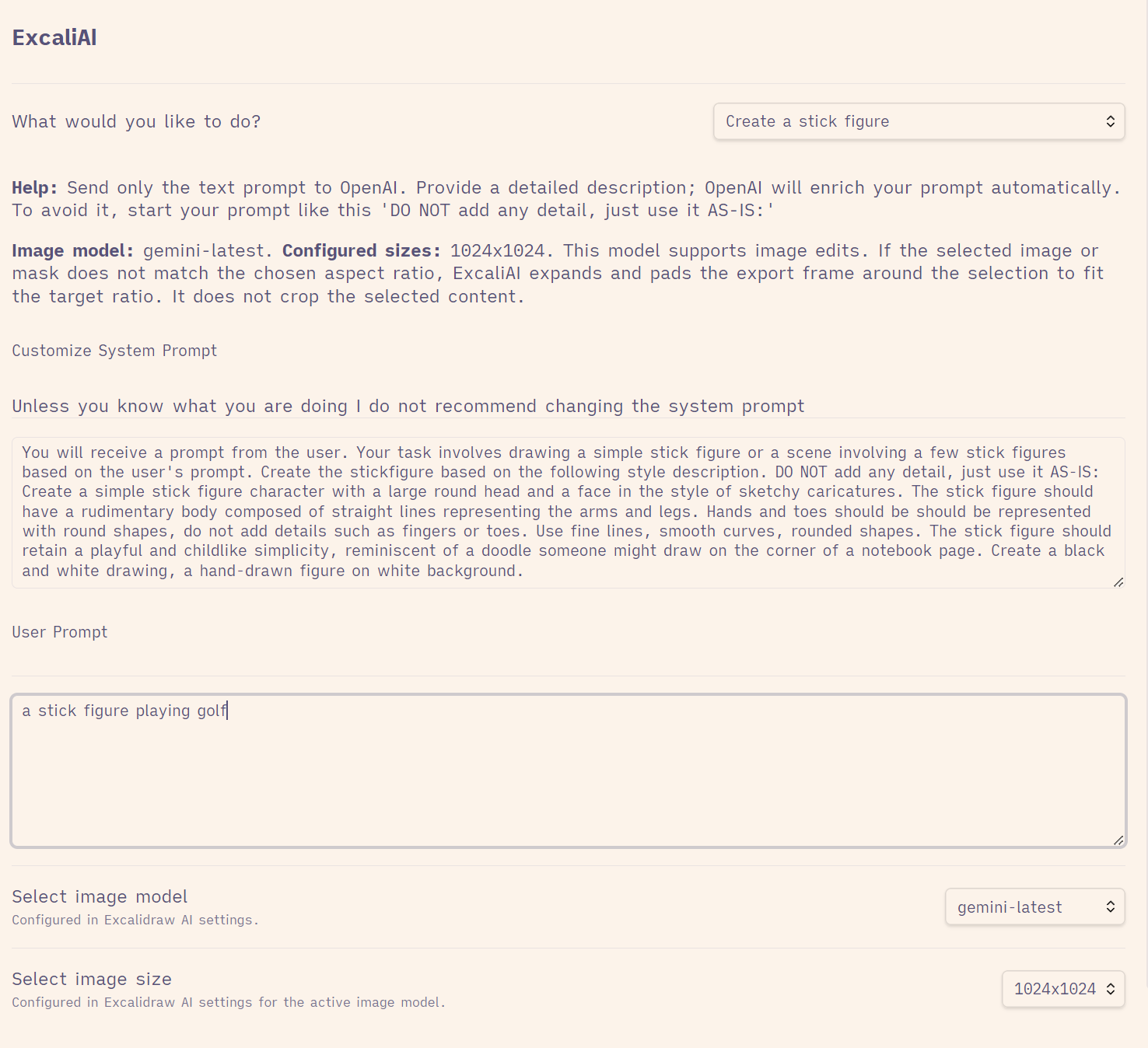
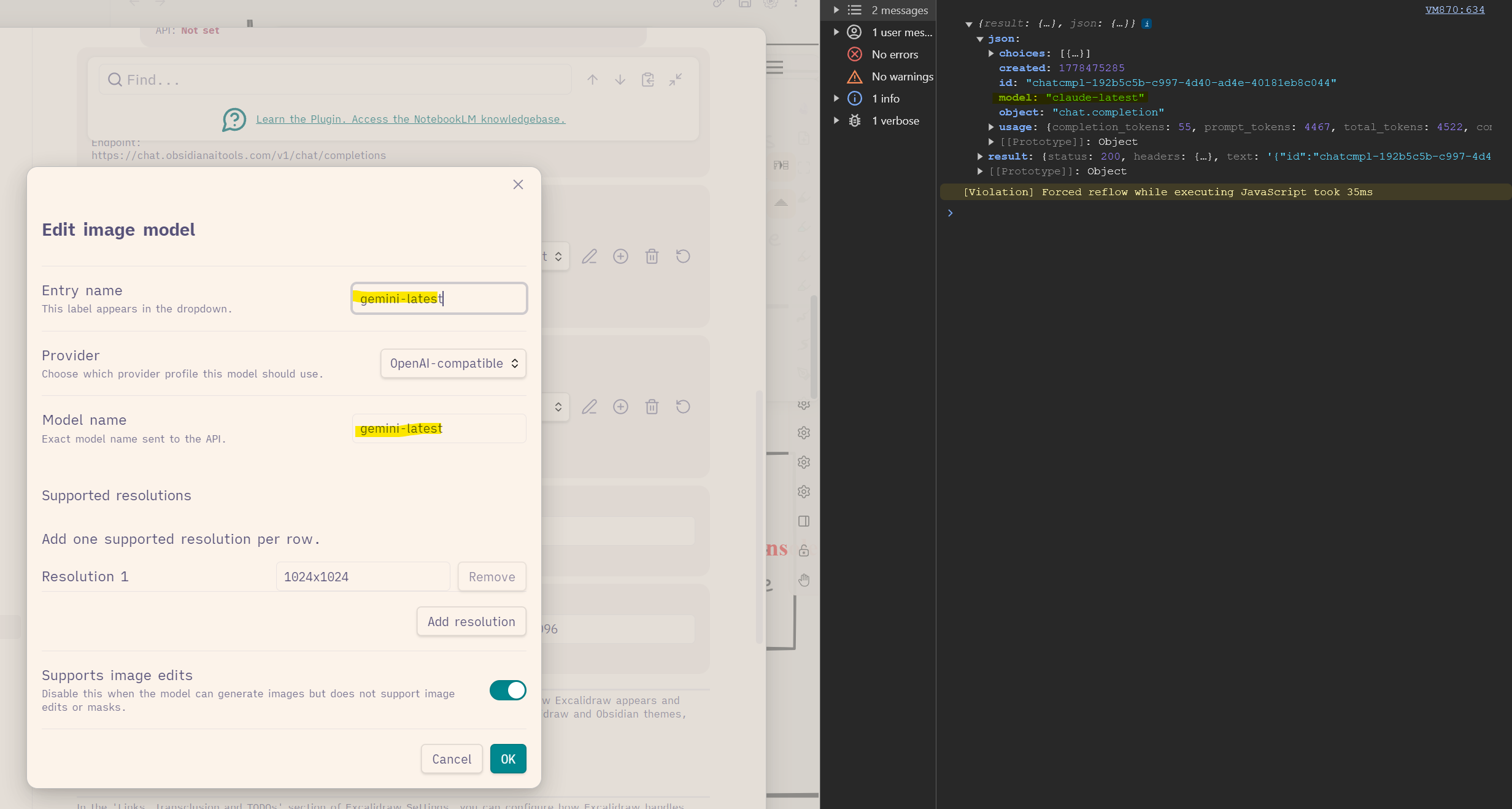
However, ExcaliAI commands supposed to provide image output do not work with my configuration. I have configured gemini-latest as image model, it is correctly selected when running the prompt – nevertheless, the obtained error seems to refer to calling claude-latest (which is set as text and vision model). Please see the screenshots below.
The configuration for the image model is the only one not allowing to specify an endpoint override. Was this intended?
Creating a stick figure first calls your text model to craft a more detailed image prompt, then calls your image model to create the image. So it makes sense, that you see the claude response, and image generation, like in the other case, is not working.
Unfortunately, the lack of standardization across providers, the paywall to set up APIs, and my time limitations may drive me to abandon this idea of more democratized approach to choice of LLM.
I’ve now set up a Gemini API. Mermaid works… but that’s about it. That said ExcaliAI is just a script. If someone has the need, they can develop a script that works with other providers. Will play with it a bit more though, before giving up.
Will release the next update soon. I got myself a gemini API key and now tested the workflow with OpenAI and with Gemini. xAI and Anthropic will require testing from the community, however, I added verbose debugging to console log to help with this.
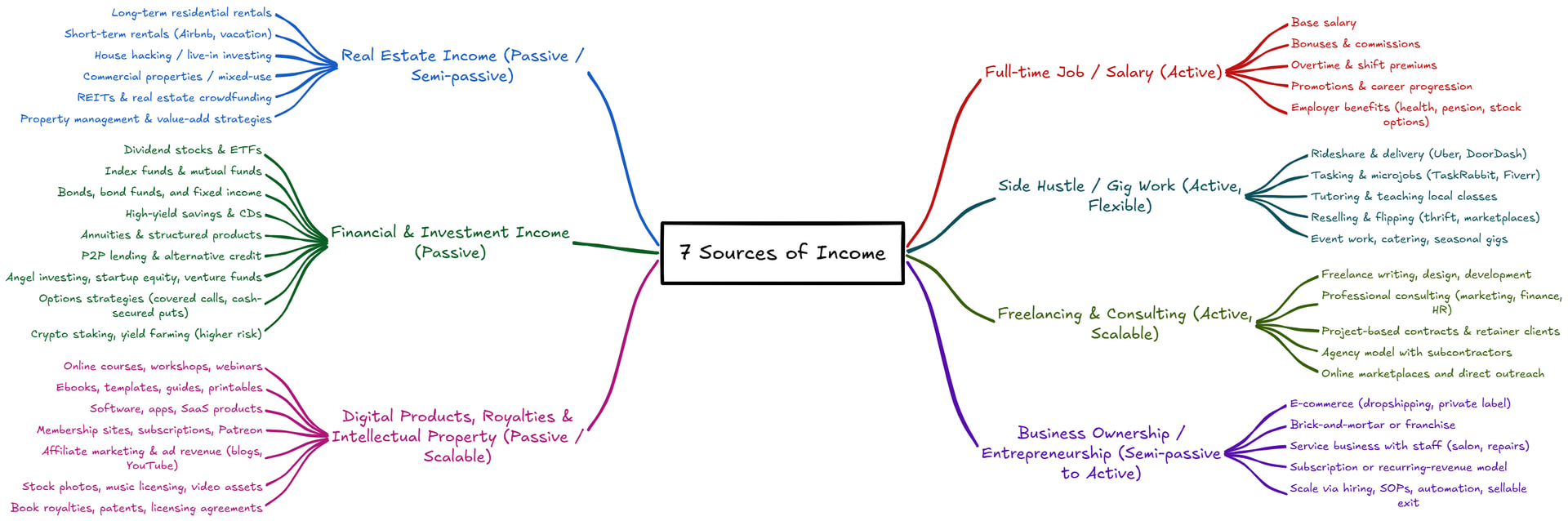
This is very exciting. I added integration with MindMap builder to excaliAI. You can prompt AI to generate a mindmap based on a whiteboard photo, picture, or simply a text prompt. Here’s an example:
Prompt was:
According to best practice we should develop 7 source of income.
Create a mindmap of potential income source organized around, active, passive, sidehussle, job, investment, etc.
This update comes with some very significant changes to the ExclaidrawAutomate interface for working with AI. I tested the changes with Gemini and OpenAI APIs. I am looking for testers to validate xAI and Anthropic (note Claude is limited to text only modes due to model limitation).
I also made significant improvements to ExcaliAI. I added support to create mindmaps. Added support for prompt based image editing (gemini does not support masking like gpt-image-2 does). You can now modify preset tasks, and create your own in ExcaliAI.
here’s an older video on ExcaliAI
Here’s the complete release update:
New
Added a new setting under Excalidraw Automate to opt-in to excalidraw-onload-scripts.
Added image cache for nested images, including nested Excalidraw drawings and PDF page renders.
When a scene is opened again on the same device, cached images are shown immediately while validation of nested changes continues in the background. This should noticeably improve loading times for scenes you access regularly.
A new setting under plugin settings in Image caching and rendering optimization lets you control cache retention in days, so you can balance disk usage against how long these cached images are kept available.
The cache is local to each device. It is not synced through Obsidian Sync or your vault, so each device builds and maintains its own cache independently.
Placeholder image for empty drawings.
AI support is now provider-aware across the plugin. You can choose between OpenAI, Anthropic/Claude, Google/Gemini, xAI/Grok, or an OpenAI-compatible/local endpoint.
AI settings now use shared provider profiles plus text/multimodal model lists, image model lists, default model selection, token budgets, and an optional verbose developer-console logging toggle for troubleshooting.
The shared AI configuration is now used by ExcalidrawAutomate, Mermaid chat, diagram-to-code, ExcaliAI, and related AI features.
Older OpenAI-specific AI settings are migrated automatically into the new shared AI settings on first run.
Fixed Mermaid chat / text-to-diagram and diagram-to-code to use the shared AI layer and honor the configured provider, model, API key, and endpoint settings.
Fixed the ExcaliAI script to work with the new shared AI settings, including provider-aware text and image model selection, prompt transforms vs mask edits, and OpenAI image responses that return b64_json instead of a hosted URL.
New in ExcalidrawAutomate
Added new provider-aware AI helper functions for scripts while retaining backward compatibility for existing postOpenAI() integrations.
Added getAISettings() to inspect the shared AI settings from scripts.
Added analyzeAIImage(), generateAIImage(), transformAIImage(), and maskEditAIImage() for shared text/image workflows.
Added createAIChatSession() to preserve chat history between calls without manually maintaining the messages array.
Added extractCodeBlocks() to simplify parsing model responses that return fenced code blocks.
Updated addImage() to accept data:image/... data URLs directly, in addition to files, hyperlinks, vault paths, and PDF++ references.
/**
 * Posts an AI request to the currently configured provider and returns the response.
 * @param {AIRequest} request - The AI request configuration.
 * @returns {Promise<RequestUrlResponse>} Promise resolving to the provider-normalized API response.
 */
public async postAI(request: AIRequest): Promise<RequestUrlResponse>;

/**
 * Backwards-compatible alias for `postAI()`.
 * Existing scripts can keep calling `postOpenAI()` while using the shared provider, model, API key, and endpoint settings.
 * @param {AIRequest} request - The AI request configuration.
 * @returns {Promise<RequestUrlResponse>} Promise resolving to the provider-normalized API response.
 */
public async postOpenAI(request: AIRequest): Promise<RequestUrlResponse>;

/**
 * Returns the shared AI settings exposed to scripts.
 * @returns {ExcalidrawAISettings | null} Shared AI settings or null if AI is unavailable.
 */
public getAISettings(): ExcalidrawAISettings | null;

/**
 * Sends an image-aware text request using the shared multimodal routing.
 * @param {AIRequest} request - The AI request configuration.
 * @returns {Promise<GenerateAITextResult>} Promise resolving to normalized text output.
 */
public async analyzeAIImage(request: AIRequest): Promise<GenerateAITextResult>;

/**
 * Generates a new image using the configured image model.
 * @param {AIRequest} request - The AI request configuration.
 * @returns {Promise<GenerateAIImageResult>} Promise resolving to normalized image output.
 */
public async generateAIImage(request: AIRequest): Promise<GenerateAIImageResult>;

/**
 * Applies a prompt-based transform to an input image.
 * @param {AIRequest} request - The AI request configuration.
 * @returns {Promise<GenerateAIImageResult>} Promise resolving to normalized image output.
 */
public async transformAIImage(request: AIRequest): Promise<GenerateAIImageResult>;

/**
 * Applies a mask-based edit to an input image.
 * @param {AIRequest} request - The AI request configuration.
 * @returns {Promise<GenerateAIImageResult>} Promise resolving to normalized image output.
 */
public async maskEditAIImage(request: AIRequest): Promise<GenerateAIImageResult>;

/**
 * Creates a lightweight chat session helper that preserves prior conversation turns between calls.
 * @param {Omit<AIRequest, "messages">} initialRequest - Default request fields applied to every send.
 * @returns {AIChatSession} Chat session helper with `getMessages()`, `reset()`, and `send()`.
 */
public createAIChatSession(initialRequest?: Omit<AIRequest, "messages">): AIChatSession;

/**
 * Extracts code blocks from markdown text.
 * @param {string} markdown - The markdown string to parse.
 * @returns {Array<{ data: string, type: string }>} Array of objects containing code block contents and types.
 */
public extractCodeBlocks(markdown: string): { data: string, type: string }[];

/**
 * Adds an image element to the ExcalidrawAutomate instance.
 * @param {number | AddImageOptions} topXOrOpts - The x-coordinate of the top-left corner or an options object.
 * @param {number} topY - The y-coordinate of the top-left corner.
 * @param {TFile | string} imageFile - The image file, hyperlink, vault path, PDF++ reference, or data URL.
 * @param {boolean} [scale=true] - Whether to scale the image to MAX_IMAGE_SIZE.
 * @param {boolean} [anchor=true] - Whether to anchor the image at 100% size.
 * @returns {Promise<string>} Promise resolving to the ID of the added image element.
 */
async addImage(
  topXOrOpts: number | AddImageOptions,
  topY: number,
  imageFile: TFile | string,
  scale: boolean = true,
  anchor: boolean = true,
): Promise<string>;
Text-only tasks seem to work with OpenAI-compatible provider+Gemini. Whenever text and image are involved, I run into errors. For Edit an image I get an informative error message that tells me the configured endpoint might be the problem. Is there a way to override the endpoint for an image model? I do not see this option in the model configurator (only for text models).
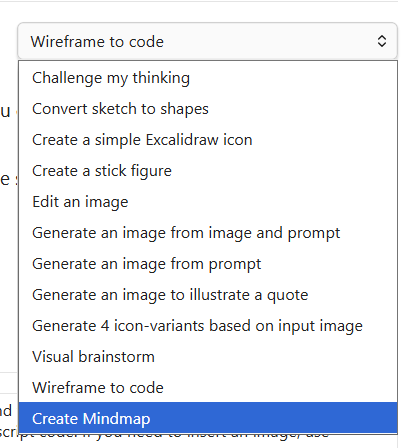
Apart from that, which ExcaliAI function did you use to generate a mindmap as output?
Don’t use Gemini in OpenAI compatible mode. Run it as Gemini.
OpenAI compatible is there for local LLM support.
I forgot to update the timestamp on ExcaliAI script. Open scripts, scroll down to ExcaliAI, and press update (even though it does not display there is an update). Then you’ll see the new script and the mindmap option. That should also solve the compatibility issue with Gemini.
I successfully created mindmaps with ChatGPT, Claude and Gemini. However, I think we are not quite on the same page here:
See, I need to work in OpenAI-compatible mode because this is the only thing my provider offers. Base URL and Endpoint look like OpenAI and they manage to offer different models under that configuration. The below setup produces mindmaps with all of the configured models - when I configure Gemini as provider and override Base URL and Endpoint it actually does not work.
I avoid new APIs in Obsidian (anything newer then 1 - 1.5 years) because many people fail to update Obsidian. So yes, I should use keychain, but compatibility is a major issue across a broad user base.
Sure, didn’t think of that. There’s another thing about the API keys, though: When I look into the script and the EA library, it looks like an API key is also mandatory when addressing a local LLM. In fact, I cannot choose any local LLM (running under Ollama) as long as no API key is set. Was this intended?
This was not intended. I am not using local LLMs so the question never crossed my mind. Certainly adds another layer of complexity to verify if key is available.
Have you played with local LLMs. API key cannot be set?
The first attempts at using a local LLM did not work – playing around is always the next option. Just wanted to make sure my understanding was correct Thanks!
Added a label in Plugin Settings for OpenAI-Compatible Providers that a dummy API key should be provided, even if the local LLM does not require a key, otherwise interface functions will fail.
Added API Key obfuscation in plugin settings. This prevents your API keys from leaking via plugin data.json (your settings file), in case you share your entire Vault with an LLM.
Happy to help test on the Anthropic side. A fully agentic backoffice runs many of our nonprofit ops and we share it all to help other nonprofit orgs (transparency.quietlyworking.org).
We use Obsidian and Excalidraw daily in our system and would love to help test your API and report findings back to you.
No new features only code restructuring (and some hidden bug finding) to improve on Obsidian plugin ranking…
While changes are low risk, I’ve touched practically every single file in the project, and touched them in a big way. This means there could be hidden issues. Please keep your eyes open. I will give this a few days to see what surfaces. (hopefully nothing)



 Anyway, let me know in case you want to test some more against other providers.