K-Plex 0.4.6 is live. Choose a note type and fill in its properties as you create a note, change a relationship directly from the canvas, and recognize local videos by their thumbnails. You can also keep working on the visible graph while K-Plex catches up with folder changes.
Download / update the K-Plex Help Obsidian Vault for walkthroughs, screenshots, and videos. Open Start Here or browse the 0.4.6 release note in the Help vault.
Create the note you meant to make
In Add relationship, choose a file type, select a Note type, and fill in its properties before saving. You can give the note a display name that differs from its filename, and template properties you leave alone keep their values. The Action menu below the file type and template controls lets you choose what happens after saving. See Create notes and placeholders.
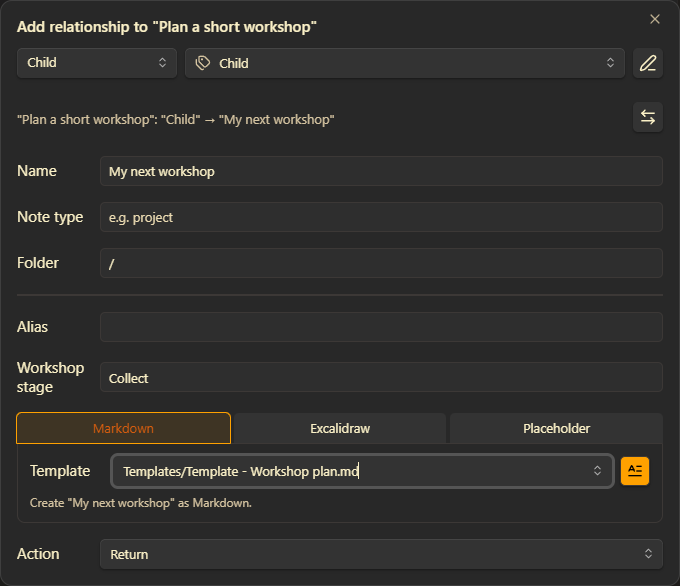
Relationship search can find attachments such as images, PDFs, and drawings when the Markdown source can own the link. You can also paste a complete Markdown web link or wikilink and keep its display label. K-Plex tells you when the current filters or lenses hide a newly saved connection. The Add relationship command remembers your last saved role and field and uses the canvas you invoked it from as the source. See Create a relationship.
Inspect and change a connection
Right-click a connector and choose Change ontology when a single frontmatter property or a matching reciprocal pair defines the relationship. The dialog starts in the current direction and lets you choose any of the six directions. On an inferred connection, Define relationship lets you add a property in any direction while keeping the original link, including when K-Plex already shows it as an inferred Parent.
Connection details puts the add, change, visibility, and style actions above the source evidence. Relationships defined in the Markdown body can be edited in the source note. The Hide connection form also handles first-time setup of the Hidden property. See Connection details and evidence.
Recognize videos on the graph
Visible local video attachments can show a still frame next to the filename. Generate thumbnails for local videos is on by default under Node images. Unsupported videos and videos with oversized frames use the attachment icon. YouTube link nodes can also show previews when Allow remote node images is enabled. See Images in nodes.

Organize folders and keep exploring
Import a folder with its nested files and empty subfolders. K-Plex skips .DS_Store files and can retry a partial import without copying everything again. Right-click a folder on the graph to rename or delete it. Deleting a file or folder also removes its entries from Past nodes and fixed pins. Folder deletion has its own confirmation preference, and you can turn off the move confirmation and Remaining references dialog separately. See Drag drop and reclassify and Unlink and delete.
While restoring a saved graph, K-Plex queues wider checks caused by folder changes and prioritizes edits affecting the visible canvas. Index diagnostics include more detail for troubleshooting. Copy-only imports keep moving without waiting for note templates, and Obsidian and the template determine how a new note first opens. See How indexing works.
Tune navigation and explore the CLI skill
Pinch zoom sensitivity adjusts trackpad and touchscreen zoom. The default is 5, and existing settings keep their saved values. Property labels and icons fit more consistently in Compass, Mind Map, and Facets. New vaults use lowercase default relationship field names. See Mobile and touch.
The K-Plex Obsidian CLI skill gives a local assistant a guide to inspecting your map. See Use K-Plex through Obsidian CLI.
Change history
Browse K-Plex releases and the changes in #323, #324, #325, #326, #327, #328, and #332.