Download the updated K-Plex Help to explore the new features.
Start a note from the right template, choose what happens after saving, and work with a clearer map on desktop, phone or tablet. K-Plex 0.4.4 brings more control to note creation, relationship editing and the places you return to.
Start with the right kind of note
Markdown, Excalidraw and Placeholder have separate creation tabs. Each file type has its own template list; the Excalidraw tab appears only when its integration is available. K-Plex remembers the last tab. Choose a Markdown template folder with the existing folder suggester in settings, or use Excalidraw’s configured templates for drawings.
Compact Name, Alias, Folder and Action rows keep creation practical in narrow panes. The Action choice sits above the type tabs. Escape closes an open template list before it closes the dialog, and the create action describes the selected type.
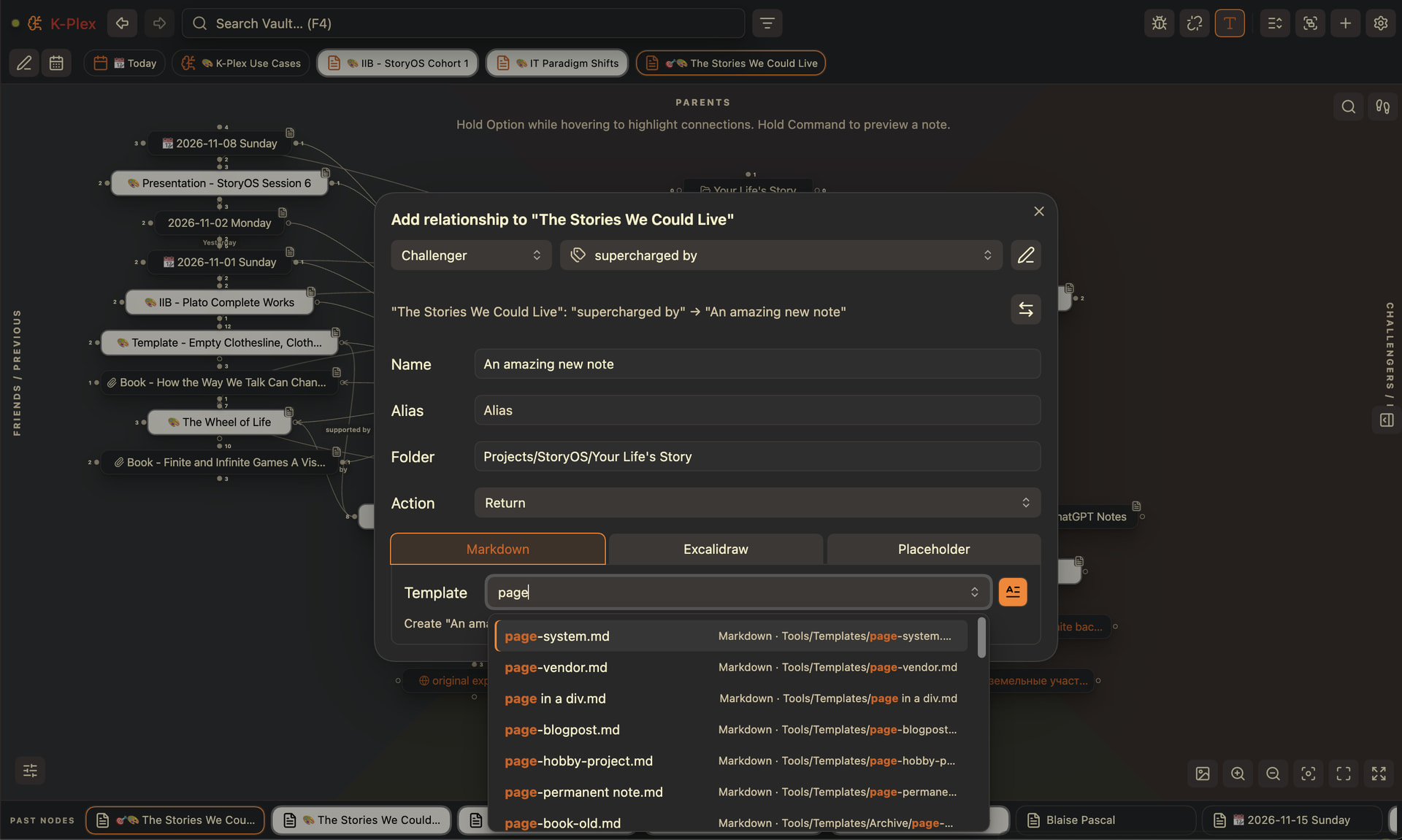
Desktop: choose the type and its template independently of the Action that follows saving.
Put meaning into your relationships
The new Add relationship, Add previous and Add next commands open the same relationship composer. Lateral drags remember whether you last used Friend/Challenger or Previous/Next. Hold Alt/Option for Previous/Next, or Ctrl/Cmd for Friend/Challenger; a hint on the canvas shows the available choices.
An optional setting also writes the configured inverse ontology to the other Markdown note. It starts off: one declaration is normally enough to show a connection. Both physical writes are explicit, and recovery handles a partially completed save.
Go to source is available directly from a connector menu when there is one distinct, locatable physical occurrence. You can opt into Ctrl/Cmd-click or Shift-click for that action. Ambiguous, stale or inferred-only connections retain Connection details so you can choose the source yourself.
Give notes a useful identity
Note types and tags share one style definition. Setting a Note type writes the configured document property and its matching tag together. Styles can display an ordered selection of document properties below the name; adding missing properties and reviewing existing note types are explicit actions, never a vault-wide automatic rewrite.
When renaming a note, choose whether to update the existing configured display-name property, such as an alias or title. Other aliases are preserved. See [[Node styles from help tags]].
Revisit and connect without losing your place
Pins and Past nodes support horizontal dragging to scroll and outward dragging to create relationships or bring links into Obsidian tabs. Desktop users can also hold the middle mouse button to scroll. Ctrl/Cmd-hover opens a native page preview without a tooltip covering it. Editing mode keeps pin reordering separate from ordinary dragging.
Creating today’s Daily Note can offer a link to the nearest earlier entry when yesterday’s note is missing. Choose the offer to review the connection; no journal link is written without that review. The Help vault’s release-day notes demonstrate an explicit earlier / later chain.
Shape the neighborhood you need
Siblings now means second-order neighbors across all six direct relationship roles, rather than only notes sharing a Parent. Already displayed direct notes and expanded Child rows are not repeated there.
Views and lenses separates attachment visibility into Documents, Images, Audio & video, and Other attachments. Existing attachment preferences are retained. Facets presets support up to 12 categories in the supplied layouts.
More room on mobile, less waiting at startup
Views and lenses and other floating panels stay within their own phone/tablet canvas, including a wide sidebar. Normal mobile tabs leave room for Obsidian’s navigation below K-Plex; Zen and fullscreen hide that navigation. Native editors opened near the bottom no longer displace canvas controls, directional tint or connector drags. Explicit external-link taps use native handling when the desktop Web viewer is unavailable.
The New canvas tab and Settings controls show modifier-click destinations in their tooltips. Settings supports Ctrl/Cmd-click for plugin settings and Alt/Option-click for area settings.
Plugin initialization does less work before the workspace is ready, reducing the load-time pause in larger vaults. Indexing remains a separate activity; the first load after installing a build can take longer than later starts.
Reliability and polish
Explicit Challenger relationships survive turning a placeholder into a file. A deleted new note retains incoming connections when it becomes a placeholder again. Excluded metadata-only Date fields do not override explicit inline ontology. Sidecar opens the central note on its first activation in a popout, and detaching it leaves its native tab available.
Change history
This page summarizes note types and properties, neighborhoods and authoring, creation dialogs and startup, and mobile layout and navigation.