K-Plex 0.2.0 — Your Knowledge, Your Workspace
K-Plex is growing beyond navigating connected notes. With this release, you can organize your knowledge directly from the graph, work with multiple independent Plex views, retrace your explorations, and make K-Plex look and feel like your Obsidian workspace.
This is a major update, with new ways to work with your notes and many improvements to navigation, styling, indexing, and reliability.
Check out also the updated K-Plex help: GitHub - zsviczian/kplex-help: K-Plex Demo Obsidian Vault · GitHub
 What’s New
 Organize your vault while exploring
K-Plex is becoming a place where you can actively organize your knowledge.
- Drag notes between Plex views, or drag them into a Markdown editor to insert links.
- Move files and folders by dropping them onto folder destinations.
- Assign tags and Note Types through drag-and-drop, including from pins and history.
- Create notes and placeholders in a chosen folder.
- Create relationships between siblings without losing their existing connections.
- Navigate and create connections from Obsidian Bases, just as you can from the File Explorer.
Folder moves use Obsidian’s native file operations. Tag and Note Type actions update your notes’ properties, keeping your knowledge in your Markdown files.
See PR #177.
 Keep two lines of thought open
You can now open multiple independent K-Plex views!
For example, keep your project or article centered in one Plex while exploring references in another.
Each Plex can have its own:
- Central node and navigation context.
- Document synchronization mode and associated note tab or Sidecar.
- Editor or Markdown reading mode.
- Footprints trail (see below).
Pins and saved Past nodes history remain shared between Plex views.
You can also fold a Plex tab group to give your document more room, then unfold it when you need the graph again.
See PR #177, PR #187, and PR #173.
 Garden your vault, one note at a time
Obsidian’s built-in File properties pane can now follow the central note in K-Plex.
As you navigate, its properties update automatically, provided the pane is unpinned and ungrouped.
This creates a natural workflow for reviewing and improving your notes:
- Explore your knowledge in K-Plex.
- Review the current note’s properties.
- Update its status, maturity, tags, or other metadata.
- Use Graph Lenses to visualize those classifications as you continue exploring.
Combined with the new drag-and-drop actions for tags and Note Types, K-Plex makes it easier to progressively refine and organize your vault.
 Retrace your exploration with Footprints
Ever explored a chain of ideas and wondered how you got there?
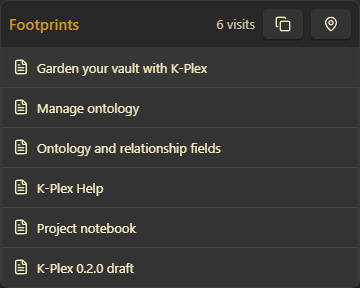
The new Footprints feature records your complete visit trail within each Plex.
- Revisit any previously visited node.
- See repeated visits, in the order they happened, newest first.
- Start a fresh trail without clearing saved history or pins.
- Copy your complete journey as Markdown and paste it into a note.
Footprints stays with your Plex during the session. Closing that Plex or restarting Obsidian clears the trail. Unlike Footprints, saved Past nodes history and pins persist between sessions.
See PR #187.
 Make K-Plex look and feel like Obsidian
K-Plex now integrates more naturally with Obsidian’s appearance and community themes.
New appearance options include:
- Native Obsidian colors that follow your active light/dark theme.
- Named themes to create, save, duplicate, and switch between K-Plex appearances.
- Named colors with separate light and dark values.
- CSS variable references for colors that follow your Obsidian theme.
- Selective color reset for base colors, semantic colors, or both.
- Optional directional background tinting to give the four areas of the Plex subtle visual identities.
- Improved controls for node and connection styling.
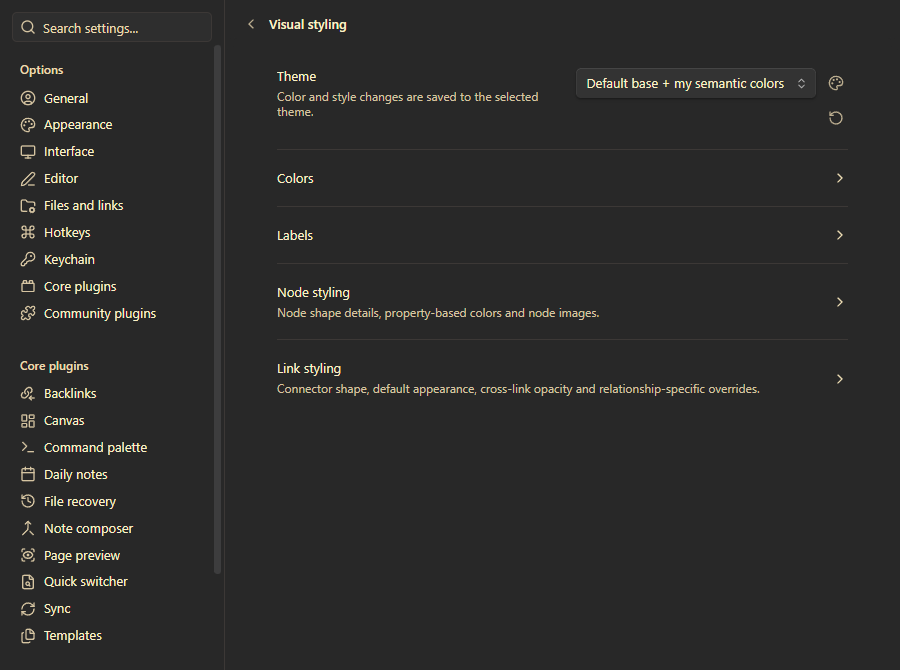
For existing users: Your previous appearance is preserved as a User theme. A one-time upgrade also introduces Default base + my semantic colors, combining native Obsidian colors with your existing semantic styling. An upgrade dialog explains the change.
Your custom node and link styles are preserved.
 Describe relationships from either end
K-Plex now supports paired ontology fields.
For example:
- Parent / Child
- Guide / Explains
- Previous / Next
- Replies to / Replied by
You can describe the relationship in either note, and K-Plex displays the appropriate connection label when viewed from either end.
The underlying properties remain ordinary Markdown/YAML properties. You only need to record the relationship once.
New installations come with reciprocal pairs configured for common relationship fields. Existing configurations and imported ExcaliBrain settings retain their assignments.
This makes your ontology easier to read and your connections more meaningful.
 Find and clean up relationship properties
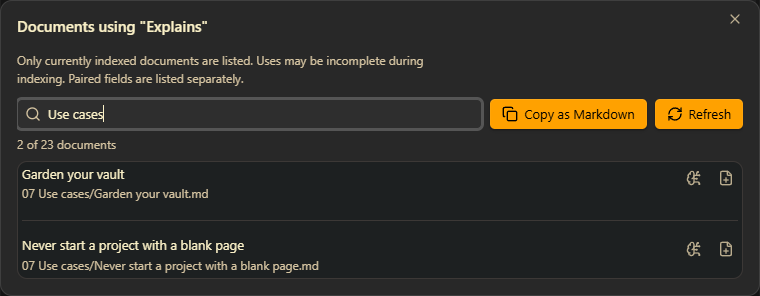
The new Manage ontology interface brings your configured and discovered relationship fields into one searchable list.
You can now:
- Search and filter ontology fields, including unassigned fields.
- Manage field assignments and inverse pairs.
- Select Show documents to see which notes use a particular property.
- Filter the matching notes, open them in K-Plex or a new Obsidian tab, or copy the list as Markdown.
- Use Refresh counts to clean up unused, unassigned fields after correcting your notes.
This is especially useful when cleaning up misspelled properties, consolidating your ontology, or understanding how a relationship field is used across your vault.
See PR #194.
 Choose when each device starts indexing
Desktop, tablet, and phone now have independent indexing settings.
Under Settings → K-Plex → Indexing config, you can choose both when index preparation starts and which indexing strategy the device uses.
| Device | Default start | Default strategy |
|---|---|---|
| Desktop | When the plugin starts | Eager |
| Tablet | When a Plex opens | On demand |
| Phone | When a Plex opens | On demand |
Delaying preparation until K-Plex opens also postpones loading the saved index. This avoids unnecessary preparation during sessions when you never use K-Plex, though the first opening may take longer.
The settings take effect after restarting Obsidian or reloading K-Plex.
See PR #195.
 Explore long notes with a clearer outline
Expanded document views have received several improvements:
- Ordinary Markdown links now stay under the headings where they appear.
- Section clusters respond better to density settings.
- Expanded notes show their relevant relationship gate counts.
- Ctrl/Cmd-hover previews the corresponding heading, even when you press the modifier after moving the pointer onto the node.
- Improved text rendering keeps labels sharper after zooming and scrolling.
- Better glyph spacing reduces clipping of large or wrapped labels.
For one-sided layouts, Friends and Challengers now share a single list on the left, with their relationship meanings preserved.
See PR #162, PR #189, and PR #149.
 More deliberate hover interactions
New modifier-key options make it easier to explore a dense Plex without constant highlighting.
You can require Alt/Option for connection highlighting and area outlines.
Holding Alt/Option over a node or gate can also temporarily reveal the crosslinks connected to it, even when normal crosslink display is disabled.
See PR #170, PR #171, and PR #181.
 Performance, Stability, and Reliability
A substantial amount of work has gone into improving how K-Plex handles larger vaults, startup indexing, settings changes, and navigation.
Highlights include:
- More efficient indexing. Reduced repeated work during index hydration and URL reconstruction. Saved graph previews can become available while background URL processing continues. #153, #163, #165.
- More reliable startup navigation. Restored central notes, saved history, and visible relationships remain more consistent as indexing progresses. #172, #183, #185, #186.
- Smoother Markdown editing. Ordinary autosaves are less likely to interrupt the visible graph or replay unnecessary node animations. #180.
- Better settings synchronization. Settings received through Obsidian Sync can update the running plugin, while preserving unrelated local changes and avoiding unnecessary write-backs. #182.
- More reliable settings and style editing. Improved save completion, ontology-field editing, and protection against overlapping updates. #146, #147, #179.
- Better diagnostics. Bug reports and copied index diagnostics now include a bounded summary of recent indexing activity, making problems easier to investigate. #174.
- More reliable note creation. New Excalidraw notes can retain their intended relationships even while background indexing is underway. #168.
 Give It a Try
If you’re upgrading from 0.1.3, I recommend starting with three things:
- Open a second Plex and try exploring two different topics side by side.
- Try Footprints as you move through related notes, then copy your exploration into Markdown.
- Visit Visual styling and try the new native Obsidian appearance while keeping your semantic colors.
You can also explore the K-Plex Help repository for guides and examples.
K-Plex is free and open source. Your ideas, feedback, and bug reports help shape its direction.
 Community: https://community.sketch-your-mind.com
 Issues and suggestions: Issues · zsviczian/kplex · GitHub
 Support development: https://ko-fi.com/zsolt
Thank you for being part of this journey!