Announcing K-PLEX (the new ExcaliBrain)

This is not what I wanted to spend my time on today… but I am happy with the end result.

What I originally wanted to do was set up SYM Talks, taking the place of the Sketch Your Mind Conference 2026—which I have been silent about for too long. I also wanted to send out a newsletter announcing this and the upcoming StoryOS Cohort. But when I opened my notes for the conference, I could not find what I wanted, so I fired up ExcaliBrain to help me. That is when I realized that the new and improved file-saving solution I implemented in Excalidraw 2.28.0 had broken ExcaliBrain…

This is when the rollercoaster started.

I did not want to touch ExcaliBrain, fearful of the Obsidian code scanner results if I published a new version. A sort of PTSD reaction. So I thought, maybe this is the time to dust off my plans to rebuild ExcaliBrain from the ground up.

For those of you who are unfamiliar with ExcaliBrain, it is a graph navigation tool for your files in Obsidian, built to emulate TheBrain, my first PKM love from over 25 years ago.

So that is how I spent my day. I was working on 3 projects in parallel: designing the setup for SYM Talks, building K-Plex (Knowledge Plex), my new plugin, and, in the end, fixing ExcaliBrain as well and working through most, if not all, of the code scanner findings.

I am proud to announce that K-Plex is here. It is a structured knowledge graph for your Obsidian Vault. It no longer requires Dataview or Excalidraw. It has many new features. For example, you can drag a line from the central node to link to a new note in your Vault, drag to create new connections, filter result sets in the view, see connections highlighted, and much more.
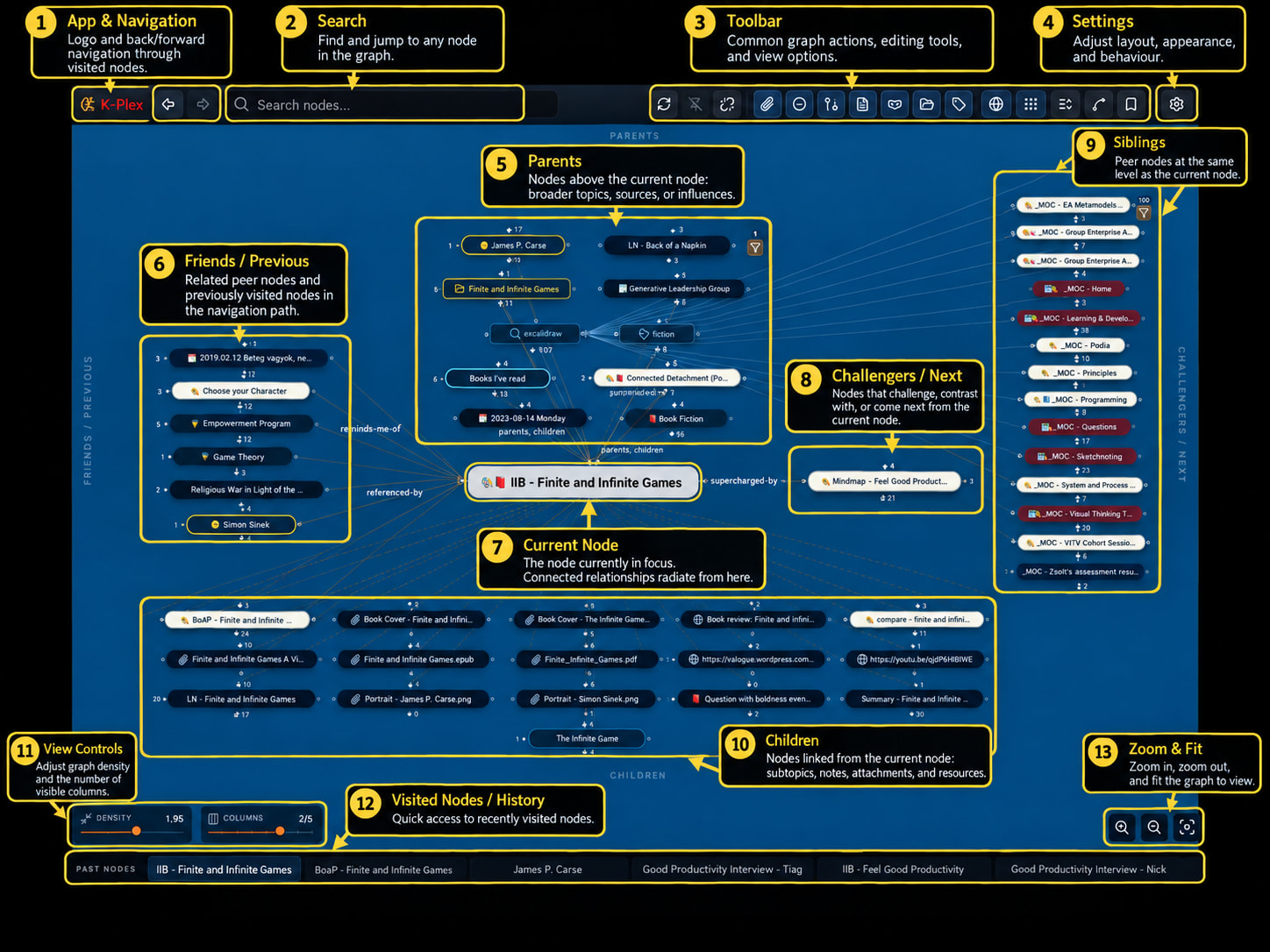
K-PLEX UI

Warning: K-Plex is a new plugin and is still undergoing real-world testing. Bugs and unexpected behavior are possible. Before using K-Plex to create or modify relationships between important notes, I strongly recommend trying it first on a small set of test notes. As with any plugin that can modify your vault, keep a current backup of your data.

Give it a go. Let me know what you think.

This is a wonderful time to be alive. Building this would have taken me 2–3 months in the past. Today, I built it while fixing ExcaliBrain, designing SYM Talks, and also enjoying some of the Sunday sunshine outdoors.

…and, to be fair, it would not have been possible half a year ago to publish a plugin to the Obsidian Community store within 10 minutes, as I was able to do today once the code was ready. I often express my frustration with code scanning, but in the end, it is exactly this scanning that made the 10-minute publish possible. I love Obsidian.

Life is beautiful.

–Zsolt

7 Likes

That is absolutely fantastic, great, and breathtaking! Thank you so much for the wonderful gift @Zsolt !!!

I fully share your excitement about what has been achieved! I am very eager and look forward to diving deeper into this now.

I was able to test and try it out a bit. Installation was no problem, and there was nothing unusual during use (just: the tooltips are appearing twice). But it simply looks great—everything is easy to read, and it looks very inviting! Super cool!!!

The ‘Creating relationships’ feature seems incredibly exciting and promising—it looks like it will allow one to stay within the visual editing mode - need to find it out … :slight_smile:.

Thanks again for your greate work!

Thanks!

…of course, by this morning I had lots of further ideas to improve the tool. Thus, for now, this is an early test version. I guess it will take a few days of usage and feedback until this becomes fully stable, comfortable, full featured.

The visual link editing is the biggest feature I was missing from ExcaliBrain. That is one powerful feature in TheBrain that I’ve sorely missed from Obsidian.

An early test version??? Are you joking? It’s absolutely brilliant. The installation and transfer of the Excalibrain settings worked a treat for me too. K-Plex has a very tidy and appealing design. I particularly like the fact that the link paths are highlighted when I hover over an entry with the mouse! Thank you so much, Zsolt, for this brilliant plug-in. And if it really is just an early test version, then I can’t wait to see what else is in store!

The default direction to generate new relations are mixed up for the top gate (leading to a Child) and bottom gate (leading to Parent) - it should be the other way around, right?

I did the following:

  1. New vault with K-Plex installed & activated
  2. New note, title “Test”
  3. New note, title “Parent”
  4. Opening K-Plex for note Test
  5. Click on top gate shows window “Add child” —> should be “Add parent”?

I also noticed that indexing is not yet perfect. To improve this, I created a test vault (set of files with a readme). Please read and look at the sample files. Let me know if you think anything is incorrect or missing from here:

KPLEX Indexing Test Data

Amazing! I’ve been hoping that you would be able to find some time and get back to ExcaliBrain, this is even better!

My vault has almost 9k files in it and I use the Fileclass plugin to classify note types and standardize on metadata. The plugin provides flexibility to assign a class via frontmatter field fileClass: or with tags, as well as allowing me to define inheritance. I’ve gone back and forth several times between using key:value pair and tags because of how I am able to filter, style, etc. with native graph view and other plugins.

I’d like to style the nodes based on the classification. Can you provide a recommendation on what will be more robust/scalable for styling nodes in ExcaliBrain/K-Plex?

I will be publishing a new version later today with much improved indexing, more metadata support, proper mobile support (KPlex in the sidepanel is awesome - testing it now), ability to expand the note by sections and see links on the graph, and many more new features. I’d say play with it an let me know what would work for you. You are at the right time to share ideas, while I have some strong opinions about how I want kplex to work, this is the time to chip in… at the pace this is moving ahead in a few days time I am likely going consider this as done for now :slight_smile:

I am not familiar with Fileclass. KPLEX supports (will support) document properties with links, dates and tags. There is going to be a special (configurable) document property for a note type tag. On top of this, kplex supports dataview style inline ontology.

Both:
ontology:: at the beginning of a [[paragraph]]
and inline (ontolog:: [[with]] [[links]]) and all.

It will also support simple #tags as well.
I think that is already plenty flexibility. But let me know what you miss. Or even better share a sample note with the type of markup you have in mind, and explain what you want that markup to do.

2 Likes

Sounds good, I’m looking forward to it!

Node Styling based on frontmatter list field
There are multiple ways within Fileclass to classify a note but the primary one is a document property. It’s a list of string values, it would be great if I could use those values for styling in KPLEX.

Frontmatter example

fileClass:

  • class1
  • class2

-–

Hide/Show Nodes based on filter context

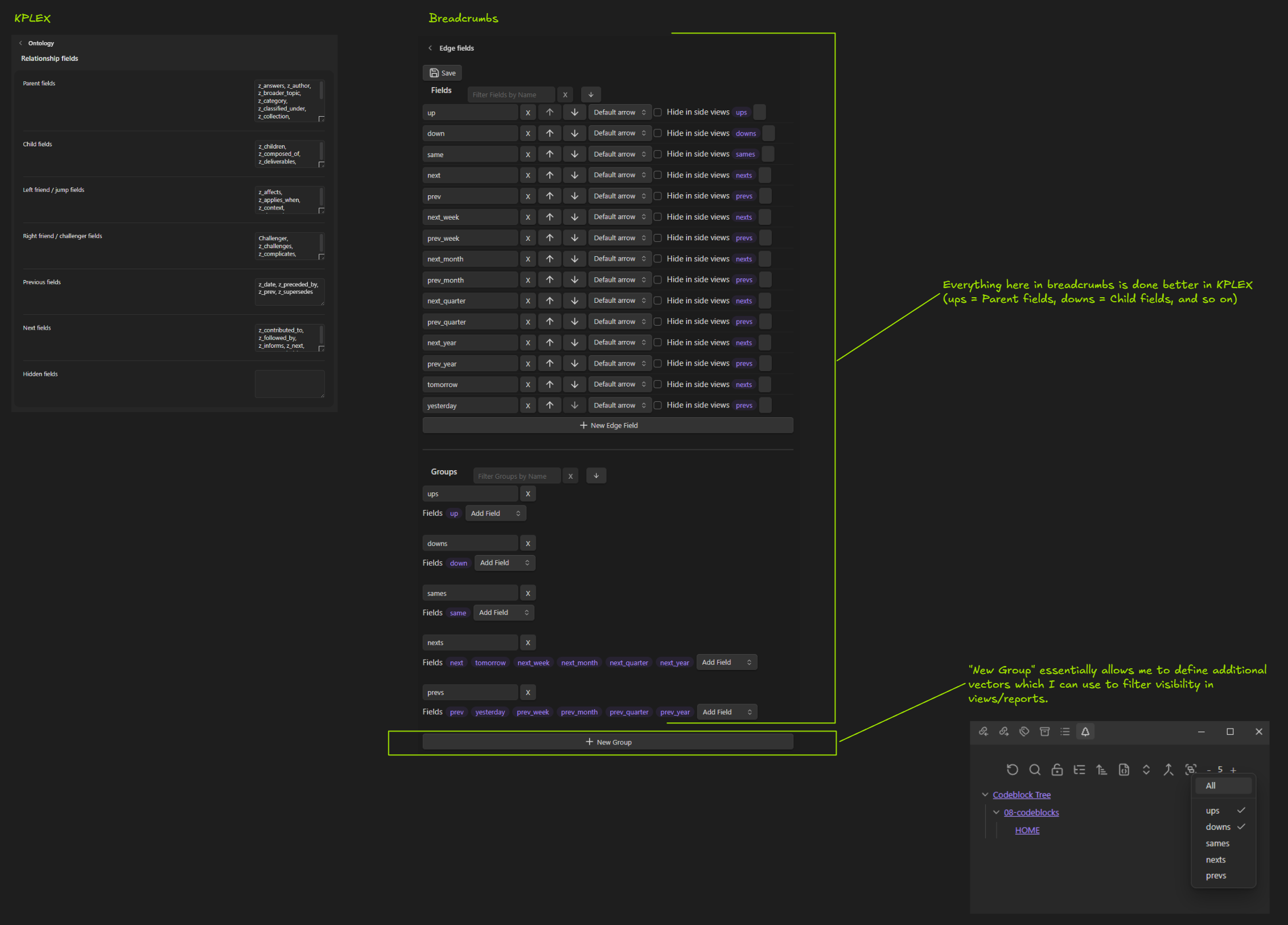
Another feature that would have a significant impact on how efficiently I could use KPLEX would be to allow fields to be grouped into named graphs. For example, informed-by, elaborates, and challenges might make sense in my Knowledge Graph, and parent-project, objectives, and deliverables would fit into a Project Management Graph.

Then be able to hide/show nodes based on their grouping. Similar to the Breadcrumbs plugin.

Grouping would be ideal but even being able to hide/show nodes based on relationship fields would be really nice to remove clutter and focus context when working on specific tasks.

It would also be really nice to filter visible nodes by a query. Obsidian Search Query, Dataview, JS, I don’t really care which syntax but with large vaults the graph can get cluttered and difficult to navigate and this would significantly help to focus the context on the immediate need. Turning on inferred relationships can overpopulate the graph quickly and this would be a great way to visually see where meaningful relationships should be added.

Formatting classes and filtering I understand. Classes could be a setting which document property to use.

The grouping I don’t yet get. Can you illustrate it somehow on a diagram? or tell me more about that feature.

What a surprise!
After the last monthly appointment and the somewhat darker hints about Excalibrain, I had already started thinking up alternative gardening methods :slight_smile:

1 Like

I was surprised as well… Frankly it was not clear to me what it would take to get ExcaliBrain working with Excalidraw 2.28.0, therefore I started down two paths at once. Fixing ExcaliBrain and restarting my work from January, when I already developed a very long specification of kplex based on all my ExcaliBrain videos, my book, and of course ExcalBrain source code… So I was not really starting from scratch, I did the thinking in January, but at the time I did not have the tools / time to generate this level of code that GPT Sol created on Sunday.
Anyways, now I’ve committed myself to the journey, and am optimistic about the outcome.

The use-case I have in mind is say that I’m creating a WIKI style deliverable, each one of the WIKI pages will have several relationships to different kinds of notes (sources, atomic, fleeting, other wikis, meetings, etc.) Relationship fields from research notes will be different from fields used in meetings or other wikis and therefore could be grouped together.

It would provide another way to query that is defined by the ontology vs a note classifier. Instead of hide all #meeting nodes, I’d be able to hide all nodes that have activity-context-for: [[active note]]

Here is a quick sketch that hopefully helps illustrate how Breadcrumbs allows additional graph definition.